Want to calculate Azure costs accurately and stop overspending? You’re not alone. Many businesses struggle with unpredictable cloud bills. In this guide, we’ll break down everything you need to know to gain full control over your Microsoft Azure expenses—using smart tools, proven strategies, and real-world insights.



Why You Need to Calculate Azure Costs Strategically

Understanding your cloud expenditure isn’t just about tracking numbers—it’s about making informed decisions that impact your bottom line. Microsoft Azure offers a vast array of services, from virtual machines to AI platforms, and without proper cost management, your bill can spiral out of control. That’s why learning how to calculate Azure costs effectively is essential for any organization using the platform.
The Hidden Risks of Unmanaged Cloud Spending
One of the biggest misconceptions about cloud computing is that it’s inherently cheaper than on-premises infrastructure. While it can be, the pay-as-you-go model means costs accumulate quickly if not monitored. According to a Gartner report, up to 30% of cloud spending is wasted due to idle resources, over-provisioning, or lack of governance.
- Orphaned storage accounts continue billing even after VMs are deleted.
- Development environments left running over weekends rack up unnecessary charges.
- Auto-scaling policies without limits can trigger massive, unexpected spikes.
“The cloud gives you infinite capacity, but not infinite budget.” — Cloud Financial Officer, Fortune 500 Tech Firm
How Calculating Azure Costs Drives Business Value
When you can accurately calculate Azure costs, you unlock several strategic advantages:
- Cost Accountability: Assign spending to departments, teams, or projects using tags and resource groups.
- Budget Forecasting: Predict future expenses based on usage trends and growth plans.
- Optimization Opportunities: Identify underutilized resources and rightsizing candidates.
- Compliance & Governance: Ensure adherence to financial policies and audit requirements.
Ultimately, calculating Azure costs isn’t just a finance task—it’s a cross-functional discipline involving IT, DevOps, and leadership teams.
How to Calculate Azure Costs: A Step-by-Step Framework
To truly master your cloud spending, you need a repeatable process. Here’s a proven framework to calculate Azure costs with precision and confidence.
Step 1: Identify All Active Resources
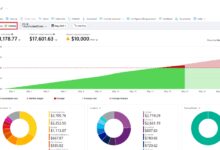
The first step in any cost calculation is knowing what you’re paying for. Log into the Azure portal and navigate to Cost Management + Billing. From there, use the Cost Analysis tool to generate a list of all active resources across your subscriptions.
- Filter by subscription, resource group, or tag (e.g., environment=production).
- Export the data to CSV for deeper analysis in Excel or Power BI.
- Look for zombie resources—those with zero CPU or network activity for 30+ days.
Microsoft provides a detailed guide on using Cost Analysis to drill down into usage patterns.
Step 2: Categorize Costs by Service Type
Azure offers over 200 services, but most spending comes from a handful of core categories. Group your costs into buckets like:
- Compute (Virtual Machines, App Services, Functions)
- Storage (Blob, Disk, Files)
- Networking (Bandwidth, Load Balancers, ExpressRoute)
- Databases (Azure SQL, Cosmos DB)
- AI & Machine Learning (Cognitive Services, Azure ML)
This categorization helps you spot trends. For example, if networking costs are rising faster than compute, you might be transferring large amounts of data between regions unnecessarily.
Step 3: Apply Tags for Granular Tracking
Tags are metadata labels you attach to Azure resources. They’re essential for calculating Azure costs by team, project, environment, or cost center. Without tags, you’re flying blind.
- Use consistent naming:
owner=john-doe,project=customer-portal,environment=staging. - Enforce tagging policies using Azure Policy to prevent untagged resource creation.
- Leverage tags in Cost Analysis to filter and group expenses.
For example, you can create a custom view showing only resources tagged with department=marketing to calculate Azure costs for that team specifically.
Top Tools to Calculate Azure Costs Accurately
While manual calculations are possible, Azure provides powerful built-in and third-party tools to automate and enhance cost visibility.
Azure Cost Management + Billing
This is the primary tool for anyone looking to calculate Azure costs. Integrated directly into the Azure portal, it offers:
- Real-time cost reports and dashboards.
- Forecasting based on historical usage.
- Budget alerts via email or webhook.
- Multi-subscription and Enterprise Agreement (EA) support.
You can set up budgets that trigger alerts when spending reaches 80% or 100% of a threshold. This proactive monitoring is critical for preventing bill shock. Learn more at Microsoft’s official Cost Management documentation.
Azure Pricing Calculator
Before deploying any new service, use the Azure Pricing Calculator to estimate costs. It’s an essential tool for planning and forecasting.
- Add VMs, storage, databases, and other services to your estimate.
- Adjust configurations (e.g., region, instance size, reserved instances).
- Save and share estimates with stakeholders.
While it doesn’t replace actual billing data, it helps you calculate Azure costs in advance and compare different architectural choices.
Third-Party Tools: CloudHealth, Apptio, and ParkMyCloud
For organizations needing advanced analytics, governance, and multi-cloud support, third-party tools offer deeper insights.
- CloudHealth by VMware: Provides cost optimization, security, and performance monitoring across AWS, Azure, and GCP.
- Apptio Cloudability: Offers showback/chargeback models and TCO analysis.
- ParkMyCloud: Automates turning off non-production resources during off-hours, reducing costs by up to 65%.
These tools integrate with Azure APIs to pull real-time data and apply machine learning to recommend savings.
Common Pitfalls When Trying to Calculate Azure Costs
Even experienced teams make mistakes when calculating Azure costs. Avoid these common traps to ensure accuracy and reliability.
Mistake 1: Ignoring Reserved Instances and Savings Plans
One of the biggest missed opportunities is not leveraging Azure Reserved VM Instances (RIs) or Savings Plans. These allow you to commit to 1- or 3-year terms in exchange for significant discounts—up to 72% compared to pay-as-you-go pricing.
- RIs apply to specific VM types in a region.
- Savings Plans offer more flexibility, applying to compute usage across families.
- Use the Recommendations tab in Cost Management to see eligible resources.
Failing to calculate Azure costs with reservations in mind can lead to overestimating expenses and missing out on savings.
Mistake 2: Overlooking Egress and Data Transfer Fees
Data transfer costs are often underestimated. While ingress (data coming in) is usually free, egress (data going out) can add up quickly, especially for global applications.
- Transferring data between Azure regions incurs charges.
- Downloading large backups or media files to on-premises systems adds cost.
- Using Content Delivery Networks (CDNs) can reduce egress fees.
Always factor in data transfer when you calculate Azure costs for applications with high outbound traffic.
Mistake 3: Not Accounting for Indirect or Shared Costs
Some costs are shared across resources or subscriptions, making them hard to allocate. Examples include:
- Azure Backup and Site Recovery services.
- Log Analytics workspaces used by multiple teams.
- Management tools like Azure Monitor and Application Insights.
To calculate Azure costs fairly, use allocation methods—such as CPU hours or storage volume—to distribute shared costs proportionally.
Advanced Techniques to Calculate Azure Costs at Scale
For enterprises with complex environments, basic cost tracking isn’t enough. You need scalable, automated methods to maintain control.
Use Azure APIs for Custom Cost Reporting
Azure provides REST APIs that allow you to programmatically access cost data. The Cost Management API lets you retrieve usage details, budgets, and forecasts.
- Build custom dashboards using Power BI or Tableau.
- Integrate cost data into internal finance systems.
- Automate monthly cost reports for leadership.
Example: A DevOps team can create a script that pulls daily cost data and posts it to Slack, increasing transparency.
Implement Chargeback and Showback Models
Chargeback and showback are financial models that allocate cloud costs to internal teams.
- Showback: Shows teams their usage and costs without actual billing.
- Chargeback: Bills teams directly, creating cost accountability.
To implement these, you need:
- Consistent tagging strategy.
- Monthly cost reports by department.
- Integration with ERP or accounting systems.
This approach encourages teams to optimize their own resources, reducing overall spending.
Leverage Azure Lighthouse for Multi-Tenant Cost Management
If you manage multiple customers or subsidiaries, Azure Lighthouse allows you to view and manage costs across tenant boundaries.
- Service providers can monitor client environments.
- Enterprises can consolidate billing views across subsidiaries.
- Centralized governance with delegated access.
This is especially useful for MSPs (Managed Service Providers) who need to calculate Azure costs across dozens of clients efficiently.
Best Practices for Ongoing Azure Cost Optimization
Calculating Azure costs isn’t a one-time task—it’s an ongoing process. Here are proven best practices to keep your spending in check.
Conduct Monthly Cost Reviews
Set a recurring calendar event to review your Azure spending. Invite stakeholders from finance, IT, and DevOps.
- Analyze cost trends and investigate spikes.
- Review recommendations from Cost Management.
- Update budgets based on business changes.
This ritual builds cost awareness and prevents surprises.
Automate Resource Scheduling
Non-production environments (dev, test, staging) don’t need to run 24/7. Use automation to shut them down during off-hours.
- Azure Automation or Logic Apps can start/stop VMs on a schedule.
- Tools like ParkMyCloud offer user-friendly scheduling interfaces.
- Save up to 70% on dev/test workloads.
Automating shutdowns is one of the fastest ways to reduce costs after calculating Azure costs.
Rightsize and Decommission Underutilized Resources
Many VMs are over-provisioned. Use Azure Monitor to check CPU, memory, and disk usage over time.
- If average CPU is below 20%, consider downsizing the VM.
- Delete unattached disks and unused public IPs.
- Archive old blobs to cool or archive storage tiers.
Regular cleanup keeps your environment lean and cost-efficient.
Real-World Case Studies: How Companies Calculate Azure Costs
Theory is great, but real-world examples show what’s possible. Let’s look at how different organizations approach calculating Azure costs.
Case Study 1: Mid-Sized SaaS Company Reduces Costs by 40%
A software-as-a-service company with 50+ microservices was facing rising Azure bills. They implemented:
- Tagging policy enforcement via Azure Policy.
- Monthly cost reviews with engineering leads.
- Reserved Instances for production VMs.
- Scheduled shutdowns for dev environments.
Result: Within 6 months, they reduced monthly costs by 40% while maintaining performance.
Case Study 2: Global Retailer Implements Showback Model
A multinational retailer wanted departments to take ownership of their cloud usage. They:
- Tagged all resources by department and project.
- Used Power BI to generate monthly showback reports.
- Integrated cost data into their internal portal.
Outcome: Teams began optimizing their own workloads, leading to a 25% reduction in unnecessary spending.
Case Study 3: Healthcare Provider Ensures Compliance and Cost Control
A healthcare organization needed to meet HIPAA requirements while managing costs. They:
- Used Azure Policy to enforce encryption and tagging.
- Leveraged Cost Management to audit spending.
- Applied reserved instances to critical workloads.
They achieved compliance and reduced costs by 30% through disciplined cost management.
Future Trends in Azure Cost Management
The way we calculate Azure costs is evolving. New technologies and practices are shaping the future of cloud financial operations (FinOps).
The Rise of FinOps Culture
FinOps is a growing discipline that combines finance, technology, and business to maximize cloud value. It emphasizes:
- Collaboration between teams.
- Real-time cost visibility.
- Continuous optimization.
Organizations adopting FinOps report better cost predictability and faster decision-making.
AI-Powered Cost Optimization
Microsoft is integrating AI into Cost Management to provide smarter recommendations. Future features may include:
- Predictive scaling based on usage patterns.
- Anomaly detection for unexpected spending.
- Automated rightsizing suggestions.
These AI-driven insights will make it easier to calculate Azure costs and act on them proactively.
Increased Focus on Sustainability
Cost and carbon footprint are closely linked. Efficient resource usage reduces both expenses and environmental impact. Azure is introducing tools to track carbon emissions, helping organizations calculate Azure costs not just in dollars, but in sustainability metrics too.
How do I start calculating my Azure costs today?
Log into the Azure portal, navigate to Cost Management + Billing, and run a cost analysis report. Start tagging your resources and set up a basic budget to monitor spending.
What’s the most accurate way to calculate Azure costs for a new project?
Use the Azure Pricing Calculator to model your architecture. Then, monitor actual usage in Cost Management and refine your estimates over time.
Can I automate cost reporting in Azure?
Yes. Use the Cost Management API to pull data into Power BI, Excel, or custom dashboards. You can also schedule email reports directly from the portal.
Are reserved instances worth it for variable workloads?
For unpredictable workloads, Azure Savings Plans are more flexible than Reserved VM Instances. They apply to compute usage across VM families and regions, offering discounts without strict commitments.
How can I reduce egress charges in Azure?
Use Azure CDN to serve content from edge locations, minimize cross-region data transfers, and compress data before transmission. Also, consider using Azure ExpressRoute for large, predictable data flows.
Calculating Azure costs is no longer optional—it’s a strategic necessity. From using built-in tools like Cost Management to adopting advanced practices like FinOps, organizations that take control of their cloud spending gain a competitive edge. By identifying waste, applying tags, leveraging reservations, and automating optimization, you can turn Azure from a cost center into a value driver. Start today: review your last month’s bill, tag your resources, and set up your first budget. The path to cloud cost mastery begins with a single calculation.
calculate azure costs – Calculate azure costs menjadi aspek penting yang dibahas di sini.
Further Reading: