If you’re exploring cloud computing, MS Azure stands out as a dynamic, scalable, and secure solution trusted by enterprises worldwide. Backed by Microsoft’s global infrastructure, it offers unmatched flexibility and innovation.



What Is MS Azure and Why It Matters

Microsoft Azure, commonly referred to as MS Azure, is a comprehensive cloud computing platform launched by Microsoft in 2010. It provides over 200 services, including computing, analytics, storage, networking, and more—all designed to help businesses innovate faster, scale efficiently, and reduce IT costs.
The Evolution of MS Azure
MS Azure began as a platform for hosting web applications under the name ‘Windows Azure.’ Over the years, it evolved into a full-fledged cloud ecosystem supporting hybrid environments, artificial intelligence, Internet of Things (IoT), and enterprise-grade solutions.
- 2010: Launched as Windows Azure for PaaS (Platform as a Service).
- 2014: Rebranded to Microsoft Azure with expanded IaaS (Infrastructure as a Service) support.
- 2018–2020: Rapid expansion into AI, machine learning, and hybrid cloud with Azure Arc.
- 2023: Over 70 cloud regions globally, making it the most geographically distributed cloud provider.
“Azure is not just a cloud platform; it’s a bridge between legacy systems and future innovation.” — Satya Nadella, CEO of Microsoft
Core Components of MS Azure
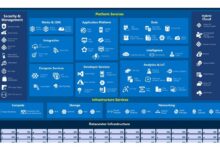
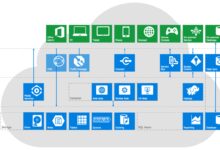
MS Azure’s architecture is built around several foundational services that power modern digital transformation.
- Compute: Virtual Machines, Azure Functions, App Services, and Kubernetes Service (AKS).
- Storage: Blob Storage, Disk Storage, Data Lake, and Archive Storage.
- Networking: Virtual Networks, Load Balancer, Azure DNS, and Content Delivery Network (CDN).
- Security & Identity: Azure Active Directory, Key Vault, and Security Center.
These components work together seamlessly, allowing developers and IT teams to deploy applications across public, private, and hybrid clouds.
MS Azure vs. AWS vs. Google Cloud: A Strategic Comparison
When choosing a cloud provider, businesses often compare MS Azure with Amazon Web Services (AWS) and Google Cloud Platform (GCP). While all three are leaders, MS Azure has unique advantages, especially for organizations already using Microsoft products.
Market Share and Global Reach
According to Synergy Research Group (2023), AWS leads with ~32% market share, followed by MS Azure at ~23%, and GCP at ~10%. However, Azure is growing faster in enterprise adoption due to its integration with Microsoft 365, Dynamics 365, and Active Directory.
- Azure operates in 66+ regions, more than any other cloud provider.
- It supports data residency requirements in highly regulated industries like healthcare and finance.
- Its hybrid cloud capabilities through Azure Stack make it ideal for on-premises integration.
For more insights, visit Microsoft’s official Azure advantage page.
Integration with Microsoft Ecosystem
One of MS Azure’s biggest strengths is its native integration with Microsoft tools:
- Seamless sign-on via Azure Active Directory (AAD).
- Direct connectivity with Office 365, Teams, and Power Platform.
- Unified management through Microsoft Endpoint Manager.
This makes MS Azure the go-to choice for enterprises running Windows Server, SQL Server, or .NET applications.
Top 7 Powerful Benefits of Using MS Azure
MS Azure isn’t just another cloud platform—it’s a game-changer. Here are seven compelling reasons why businesses are migrating to MS Azure.
1. Unmatched Scalability and Flexibility
MS Azure allows businesses to scale resources up or down based on demand. Whether you’re launching a startup MVP or managing enterprise-level traffic spikes, Azure auto-scales with precision.
- Use Azure Autoscale to respond to CPU, memory, or network usage metrics.
- Deploy globally in minutes using Azure Regions.
- Supports both Linux and Windows workloads.
2. Enterprise-Grade Security and Compliance
Security is baked into every layer of MS Azure. With over 90 compliance certifications—including GDPR, HIPAA, ISO 27001, and FedRAMP—Azure meets stringent regulatory requirements.
- Azure Security Center provides unified security management and advanced threat protection.
- Zero Trust architecture ensures identity-based access control.
- Regular penetration testing and audits are conducted by Microsoft’s dedicated security team.
Learn more about Azure’s compliance offerings at Microsoft Compliance Documentation.
3. Cost Efficiency and Transparent Pricing
MS Azure offers flexible pricing models, including pay-as-you-go, reserved instances, and hybrid benefits.
- Hybrid Benefit allows you to use existing Windows Server and SQL Server licenses on Azure, saving up to 40%.
- Azure Cost Management + Billing helps track spending and optimize resource usage.
- Free tier includes $200 credit for new users and 12 months of popular services.
This transparency makes budgeting predictable and reduces cloud waste.
4. Advanced AI and Machine Learning Capabilities
MS Azure leads in democratizing AI. With Azure Cognitive Services, Azure Machine Learning, and OpenAI integration, businesses can build intelligent applications without deep expertise.
- Pre-built APIs for vision, speech, language, and decision-making.
- Drag-and-drop ML workflows in Azure Studio.
- Integration with GitHub and OpenAI models like GPT-3.5 Turbo.
For developers, this means faster time-to-market for AI-powered features.
5. Hybrid and Multi-Cloud Leadership
Unlike pure public cloud providers, MS Azure excels in hybrid scenarios. Azure Arc enables you to manage on-premises servers, edge devices, and multi-cloud resources from a single control plane.
- Extend Azure services to any infrastructure.
- Consistent governance and policy enforcement across environments.
- Supports Kubernetes clusters on AWS, GCP, or on-prem data centers.
This makes MS Azure ideal for organizations transitioning from legacy systems.
6. Developer-Friendly Tools and Ecosystem
MS Azure supports a vast array of development tools, frameworks, and DevOps practices.
- Native integration with Visual Studio, VS Code, and GitHub Actions.
- Supports Python, Node.js, Java, .NET, Go, and more.
- Azure DevOps provides CI/CD pipelines, agile planning, and artifact management.
Developers can deploy code in seconds using Azure App Service or serverless functions.
7. Sustainability and Green Cloud Initiatives
Microsoft is committed to being carbon negative by 2030. MS Azure powers its data centers with renewable energy and offers tools to measure your carbon footprint.
- Azure Sustainability Calculator helps estimate environmental impact.
- Data centers use AI-driven cooling and energy-efficient hardware.
- Microsoft’s Climate Innovation Fund invests in carbon removal technologies.
Choosing MS Azure aligns your business with global sustainability goals.
Key MS Azure Services You Should Know
With over 200 services, navigating MS Azure can be overwhelming. Here’s a breakdown of the most essential ones.
Compute Services in MS Azure
Azure offers multiple compute options tailored to different needs.
- Azure Virtual Machines (VMs): Full control over OS and configuration; ideal for legacy apps.
- Azure App Service: Fully managed platform for web apps, APIs, and mobile backends.
- Azure Functions: Serverless compute for event-driven tasks (e.g., processing uploads).
- Azure Kubernetes Service (AKS): Managed Kubernetes for containerized applications.
Each service balances control, scalability, and management overhead.
Storage and Database Solutions
MS Azure provides robust, durable, and high-performance storage options.
- Azure Blob Storage: Object storage for unstructured data like images, videos, and logs.
- Azure Disk Storage: High-performance block storage for VMs.
- Azure SQL Database: Fully managed relational database with AI-powered performance tuning.
- Azure Cosmos DB: Globally distributed NoSQL database with single-digit millisecond latency.
These services ensure data is available, secure, and performant at scale.
Networking and Connectivity
Reliable networking is critical for cloud performance and security.
- Azure Virtual Network (VNet): Isolated network environment for your resources.
- Azure Load Balancer: Distributes traffic across VMs for high availability.
- Azure ExpressRoute: Private connection from on-premises to Azure, bypassing the public internet.
- Azure Firewall: Managed, cloud-native network security service.
Together, they form a secure and resilient network backbone.
How to Get Started with MS Azure
Starting with MS Azure is easier than ever. Whether you’re a developer, IT admin, or business leader, here’s how to begin.
Create an Azure Account
Visit Azure Free Account and sign up with your email. You’ll get:
- $200 credit valid for 30 days.
- Access to over 55+ always-free services.
- No upfront cost or commitment.
This lets you experiment risk-free.
Navigate the Azure Portal
The Azure Portal (portal.azure.com) is your central hub for managing resources.
- Use the search bar to find services quickly.
- Pin frequently used resources to the dashboard.
- Use Resource Groups to organize related components (e.g., web app + database).
Familiarize yourself with the layout to streamline workflows.
Deploy Your First Resource
Try deploying a simple web app:
- Click ‘Create a resource’ > ‘Web’ > ‘Web App’.
- Choose a subscription and create a new Resource Group.
- Select a runtime stack (e.g., .NET, Node.js).
- Review and create. Azure provisions the app in minutes.
You’ve just launched your first cloud application!
MS Azure for Enterprises: Real-World Use Cases
MS Azure powers digital transformation across industries. Let’s explore real-world applications.
Healthcare: Secure Patient Data Management
Hospitals use MS Azure to store and analyze electronic health records (EHR) securely.
- Azure API for FHIR enables interoperability with healthcare standards.
- Azure AI detects anomalies in medical imaging.
- Compliance with HIPAA ensures patient privacy.
Example: Mayo Clinic uses Azure to accelerate clinical research and improve diagnostics.
Retail: Personalized Customer Experiences
Retailers leverage MS Azure to deliver hyper-personalized shopping experiences.
- Azure Cognitive Search powers intelligent product recommendations.
- Azure Event Hubs processes real-time sales data.
- Power BI on Azure provides actionable insights from customer behavior.
Example: ASOS uses Azure to handle peak traffic during sales and personalize user journeys.
Manufacturing: Predictive Maintenance with IoT
Manufacturers deploy Azure IoT Hub to monitor equipment health.
- Sensors collect vibration, temperature, and pressure data.
- Azure Stream Analytics processes data in real time.
- Machine learning models predict failures before they occur.
Example: Rolls-Royce uses Azure to monitor jet engines and optimize maintenance schedules.
Common Challenges and How to Overcome Them in MS Azure
While MS Azure is powerful, users often face challenges. Here’s how to address them.
Complexity of Service Selection
With so many services, choosing the right one can be confusing.
- Solution: Use the Azure Services page and filter by category (e.g., AI, DevOps).
- Leverage Azure Advisor for personalized recommendations.
- Start with managed services (e.g., App Service) before moving to VMs or containers.
Cost Management and Optimization
Uncontrolled spending is a common issue in cloud environments.
- Enable Azure Cost Management to set budgets and alerts.
- Use Reserved VM Instances for predictable workloads (saves up to 72%).
- Turn off non-production resources during off-hours.
Regular audits prevent budget overruns.
Security Misconfigurations
Even with strong security tools, human error can expose data.
- Enable Azure Security Center’s free tier for basic monitoring.
- Use Azure Policy to enforce organizational standards.
- Train teams on the Shared Responsibility Model: Microsoft secures the cloud; you secure your data.
Automation reduces configuration drift.
Future of MS Azure: Trends and Innovations
MS Azure continues to evolve, shaping the future of cloud computing.
AI-Driven Cloud Operations
Azure is embedding AI into operations (AIOps) to predict outages, optimize performance, and automate fixes.
- Azure Monitor uses machine learning to detect anomalies.
- Automanage simplifies VM management with AI-based best practices.
This reduces downtime and operational burden.
Edge Computing Expansion
With Azure IoT Edge and Azure Stack Edge, Microsoft brings cloud intelligence to remote locations.
- Process data closer to the source (e.g., factories, retail stores).
- Reduce latency and bandwidth costs.
- Support offline operations with synchronized cloud sync.
This is crucial for real-time decision-making in autonomous systems.
Quantum Computing Research
Microsoft’s Azure Quantum is a cloud platform for quantum experimentation.
- Access quantum hardware from partners like IonQ and Quantinuum.
- Use Q# programming language to write quantum algorithms.
- Explore breakthroughs in cryptography, materials science, and optimization.
While still experimental, it positions MS Azure at the forefront of next-gen computing.
What is MS Azure used for?
MS Azure is used for hosting websites, running virtual machines, storing data, building AI models, managing IoT devices, and enabling hybrid cloud environments. It supports a wide range of enterprise, developer, and data science use cases.
Is MS Azure better than AWS?
It depends on your needs. MS Azure excels in hybrid cloud and Microsoft ecosystem integration, while AWS has broader service variety and market share. For Windows-based enterprises, Azure is often the preferred choice.
How much does MS Azure cost?
MS Azure uses a pay-as-you-go model. Costs vary based on services used. New users get $200 credit and free access to many services for 12 months. Use the Azure Pricing Calculator to estimate costs.
Can I learn MS Azure for free?
Yes. Microsoft Learn offers free, interactive modules on Azure fundamentals, security, and AI. You can also use the Azure Free Account to practice with real services.
Is MS Azure secure?
Yes. MS Azure is one of the most secure cloud platforms, with over 90 compliance certifications, built-in threat detection, and a dedicated security team. However, users must configure security settings properly to protect their data.
In conclusion, MS Azure is more than just a cloud platform—it’s a strategic enabler of digital transformation. With its powerful scalability, deep Microsoft integration, advanced AI tools, and commitment to sustainability, it stands as a top choice for businesses worldwide. Whether you’re a startup or a global enterprise, MS Azure provides the tools, security, and flexibility to innovate faster and stay competitive. The future of cloud computing is here, and it’s powered by MS Azure.
Further Reading: